Current Standard features

A desktop bulk editor for Shopify catalog work

See what Standard can edit, scan, import, export, back up, and restore. The page also lists the limits of image tools, CSV creation, and recovery.

Choose the products before the fields

Bulk product editing

Bulk edit Shopify products and variants with AND or OR filters and several actions in one task. Review the old and new values before anything is written.

  • 21 precise filters
  • Conditional actions
  • Selected-row execution
  • Retry failed rows
View Bulk product editing

Clear rules for every cell

Safe CSV

Update existing products with mapped columns or create new products from a Shopify-style CSV. Blank cells leave existing values alone.

  • ID, handle, variant ID, or unique SKU matching
  • __CLEAR__ and __NULL__ tokens
  • Preview before write
  • Result CSV and local backup
View Safe CSV

Update image details in batches

Image ALT and filename cleanup

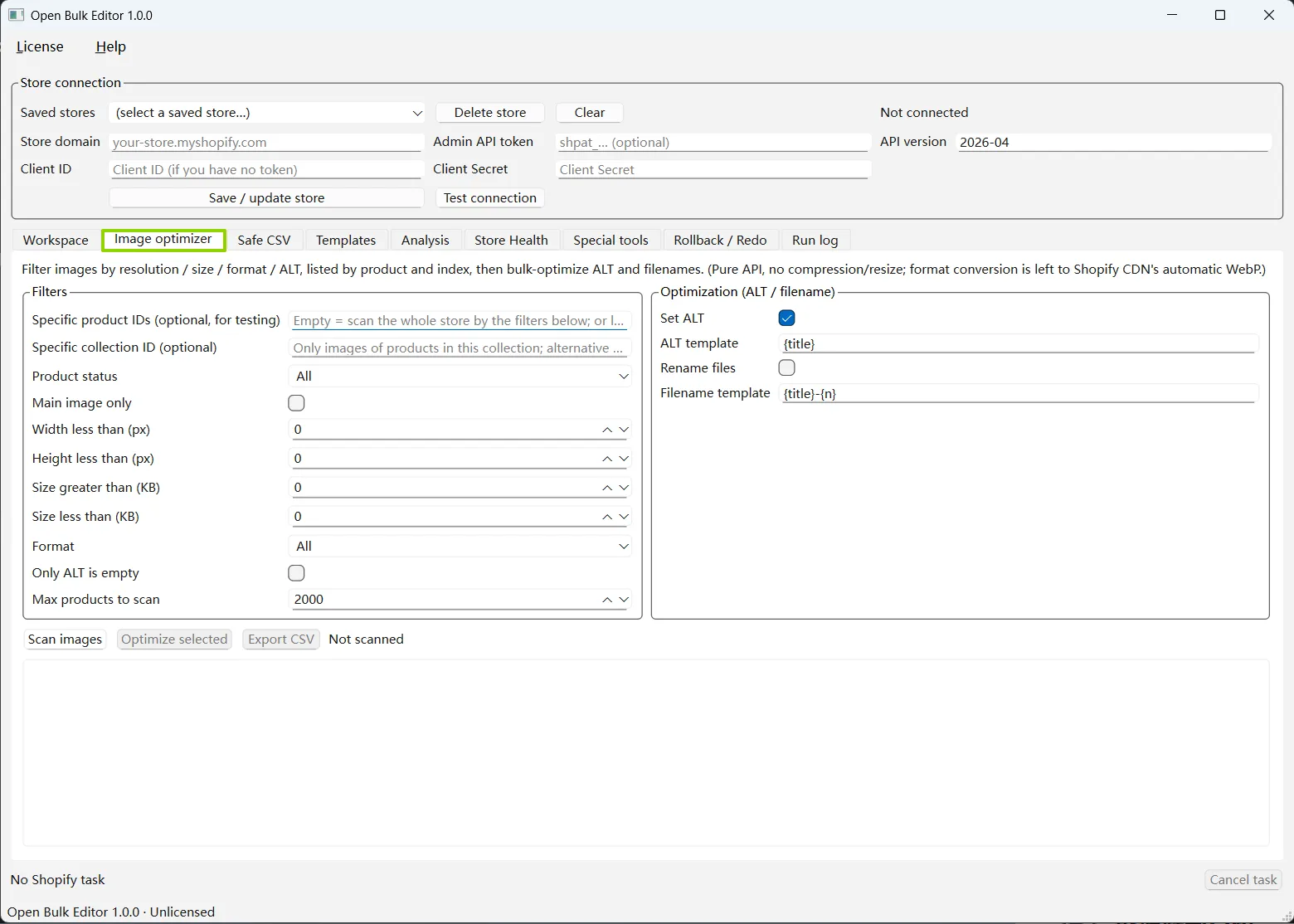
Find images by dimensions, file size, format, product status, collection, or missing ALT text. Update ALT text and filenames from reusable templates.

  • Main image or all images
  • ALT templates
  • Regex replacement
  • Filename templates
View Image ALT and filename cleanup

Read-only catalog checks

Store Health

Scan for nine product, variant, inventory, and image issues. Filter the findings and export a report without changing Shopify.

  • Missing images and ALT
  • Zero or low stock
  • Missing or duplicate SKU
  • Duplicate titles and missing descriptions
View Store Health

Read store data without changing it

Sales and catalog analysis

Find untagged products, duplicate titles, UTM orders, order counts, best sellers, ad-feed variants, and abandoned checkout items.

  • Read-only tasks
  • Refund-aware best sellers
  • Variant-level ad feed
  • CSV export
View Sales and catalog analysis

Save original values before the write

Backup and recovery

A task snapshot and local backup are prepared before a recoverable write. Roll back original values or redo the intended final values after an interruption.

  • Store-bound backups
  • Absolute redo values
  • Structured row results
  • Clear irreversible-operation warnings
View Backup and recovery

Image Optimizer

Find images that need ALT text or filename updates

Scan by product ID, collection, status, main image, width, height, file size, format, or missing ALT text. Review the matches before applying ALT and filename templates.

What this tool does not do

It does not crop, scale, convert, or compress image files. The current write actions update ALT text and filenames.

Open Bulk Editor Image Optimizer with image filters and ALT and filename templates
Image Optimizer Filter catalog images by product, collection, dimensions, file size, format, or missing ALT, then prepare ALT text and filename templates for the selected results.

Read-only analysis

Review sales and catalog data without a write

  • Untagged products
  • Duplicate titles
  • Product order count
  • UTM orders
  • Best-selling products and images
  • Variant feed for best sellers

Special tools

Handle the jobs that need their own flow

  • Rename a variant option across matched products
  • Delete a variant option with an explicit strategy
  • Move YouTube description videos into Shopify Files with local yt-dlp
  • Export abandoned checkout line items by variant

Choose the workflow that matches the job

Bulk editing, Safe CSV, and Store Health each have a detailed page with their rules and limits.